Sidebar
A composable, themeable and customizable sidebar component.
Installation
install this component
bash
npx shadcn-vue@radix add sidebarAdd the following colors to your CSS file
The command above should install the colors for you. If not, copy and paste the following in your CSS file.
css
@layer base {
  :root {
    --sidebar-background: 0 0% 98%;
    --sidebar-foreground: 240 5.3% 26.1%;
    --sidebar-primary: 240 5.9% 10%;
    --sidebar-primary-foreground: 0 0% 98%;
    --sidebar-accent: 240 4.8% 95.9%;
    --sidebar-accent-foreground: 240 5.9% 10%;
    --sidebar-border: 220 13% 91%;
    --sidebar-ring: 217.2 91.2% 59.8%;
 }

  .dark {
    --sidebar-background: 240 5.9% 10%;
    --sidebar-foreground: 240 4.8% 95.9%;
    --sidebar-primary: 224.3 76.3% 48%;
    --sidebar-primary-foreground: 0 0% 100%;
    --sidebar-accent: 240 3.7% 15.9%;
    --sidebar-accent-foreground: 240 4.8% 95.9%;
    --sidebar-border: 240 3.7% 15.9%;
    --sidebar-ring: 217.2 91.2% 59.8%;
  }
}
Structure
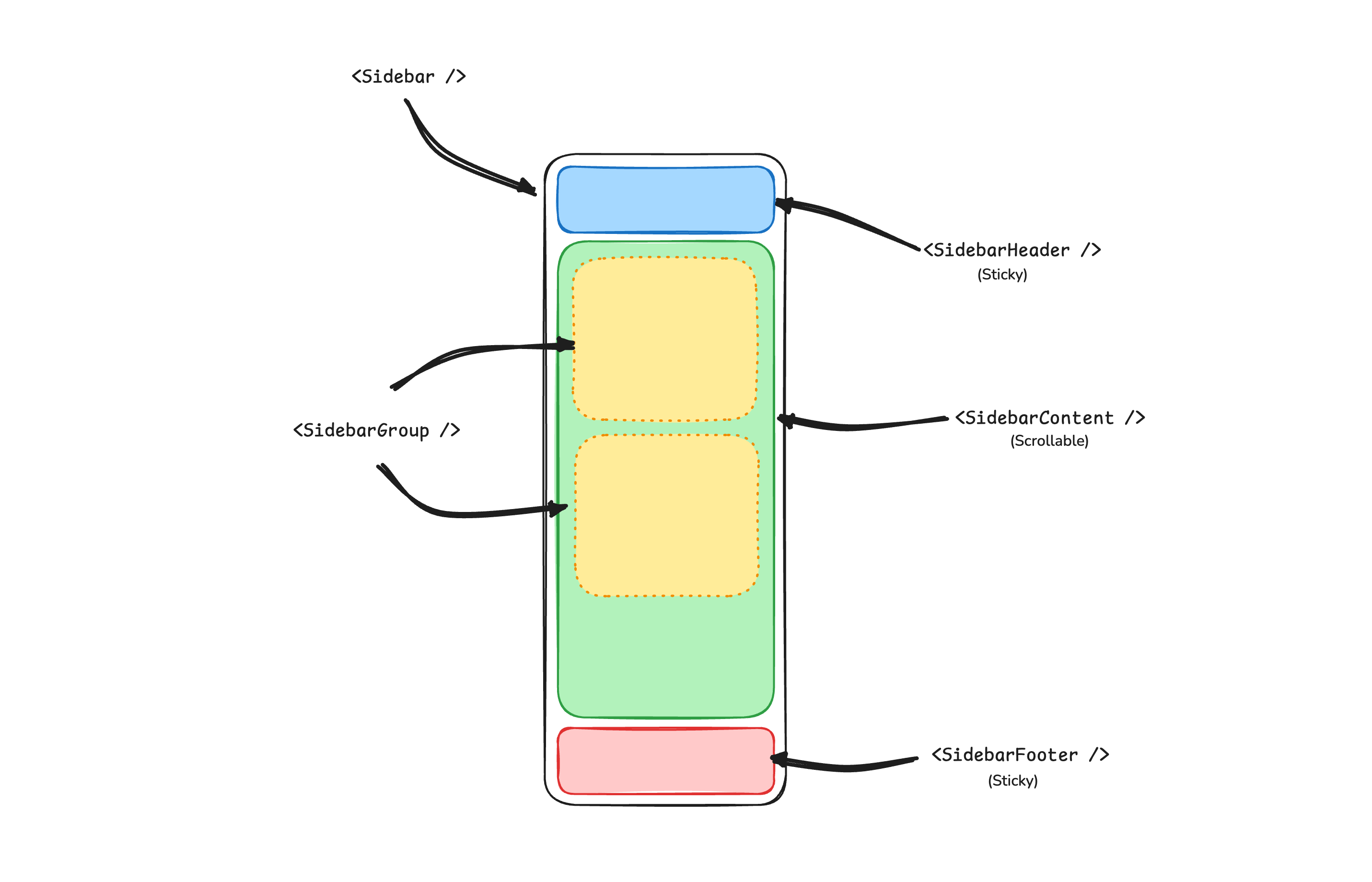
A Sidebar component is composed of the following parts:
SidebarProvider- Handles collapsible state.Sidebar- The sidebar container.SidebarHeaderand SidebarFooter - Sticky at the top and bottom of the sidebar.SidebarContent- Scrollable content.SidebarGroup- Section within the SidebarContent.SidebarTrigger- Trigger for the Sidebar.
Components
The components in sidebar are built to be composable i.e you build your sidebar by putting the provided components together. They also compose well with other shadcn/ui components such as DropdownMenu, Collapsible or Dialog etc.
If you need to change the code in sidebar, you are encouraged to do so. The code is yours. Use sidebar.vue as a starting point and build your own.
In blocks the title has Sidebar you can see how it is used.